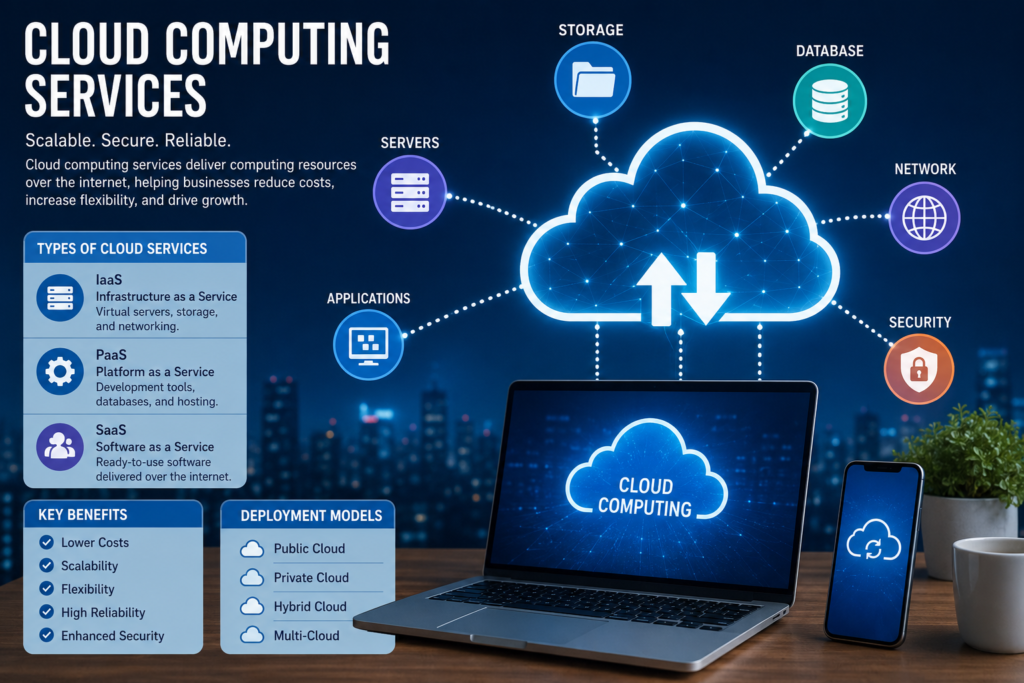
Cloud Computing Services: Complete Guide for Businesses in 2026
Learn everything about cloud computing services, including types, benefits, features, providers, pricing, security, and future trends. A complete beginner-friendly guide for businesses in 2026.
Introduction
Cloud computing services have transformed the way businesses store data, run applications, and manage operations. Instead of buying expensive servers and hardware, companies can use cloud platforms to access computing resources over the internet.
Today, businesses of all sizes rely on cloud computing to improve efficiency, reduce costs, increase flexibility, and support remote work. From startups to multinational corporations, cloud technology has become an essential part of modern business operations.
In this guide, we will explore cloud computing services, their types, benefits, features, pricing, security, and future trends.
What is Cloud Computing?
Cloud computing is the delivery of computing services over the internet. These services include:
- Storage
- Servers
- Databases
- Networking
- Software
- Analytics
- Artificial Intelligence
- Security Tools
Instead of owning physical infrastructure, users rent cloud resources from service providers and pay only for what they use.
How Cloud Computing Works
Cloud providers maintain large data centers filled with servers and networking equipment.
When users access applications or store files online, data is processed and stored in these data centers.
The cloud provider handles:
- Maintenance
- Security
- Updates
- Backup
- Scalability
This allows businesses to focus on growth rather than managing IT infrastructure.
Types of Cloud Computing Services
1. Infrastructure as a Service (IaaS)
IaaS provides virtual servers, storage, and networking resources.
Examples:
- Virtual Machines
- Cloud Storage
- Load Balancers
Benefits:
- High flexibility
- Pay-as-you-go pricing
- Easy scalability
Best For:
- IT teams
- Developers
- Large applications
2. Platform as a Service (PaaS)
PaaS provides a complete development environment.
Features:
- Application hosting
- Development tools
- Database management
Benefits:
- Faster development
- Reduced maintenance
- Easy deployment
Best For:
- Software developers
- Mobile app developers
3. Software as a Service (SaaS)
SaaS delivers software through the internet.
Examples:
- CRM Software
- Email Platforms
- Project Management Tools
Benefits:
- No installation required
- Automatic updates
- Easy accessibility
Best For:
- Small businesses
- Remote teams
Cloud Deployment Models
| Deployment Type | Description | Best For |
|---|---|---|
| Public Cloud | Shared infrastructure | Small and medium businesses |
| Private Cloud | Dedicated environment | Enterprises |
| Hybrid Cloud | Mix of public and private cloud | Growing organizations |
| Multi-Cloud | Multiple cloud providers | Large enterprises |
Major Cloud Computing Services
Compute Services
These services provide virtual servers and processing power.
Examples:
- Virtual Machines
- Containers
- Serverless Computing
Uses:
- Website hosting
- Application development
- Data processing
Storage Services
Cloud storage allows businesses to store data securely online.
Benefits:
- Easy access
- Automatic backup
- High reliability
Uses:
- Documents
- Images
- Videos
- Databases
Database Services
Cloud databases help organizations manage large amounts of information.
Benefits:
- Fast performance
- Scalability
- Security
Common Uses:
- E-commerce websites
- Mobile apps
- Enterprise applications
Networking Services
Cloud networking helps connect resources and users securely.
Features:
- VPN
- Firewalls
- Load Balancing
- DNS Management
Security Services
Cloud security protects applications and data.
Features:
- Encryption
- Identity Management
- Threat Detection
- Compliance Monitoring
Benefits of Cloud Computing Services
1. Lower Costs
Businesses avoid purchasing expensive hardware.
Benefits:
- Reduced infrastructure costs
- Lower maintenance expenses
- Flexible pricing
2. Scalability
Cloud services allow businesses to scale resources instantly.
Advantages:
- Handle traffic spikes
- Support business growth
- Improve performance
3. Flexibility
Employees can access data from anywhere.
Benefits:
- Remote work support
- Mobile accessibility
- Better collaboration
4. High Reliability
Cloud providers offer reliable infrastructure.
Features:
- Automatic backups
- Disaster recovery
- Redundant systems
5. Enhanced Security
Top cloud providers invest heavily in security.
Protection Includes:
- Encryption
- Access controls
- Monitoring systems
Top Cloud Computing Providers
| Provider | Best For | Strength |
|---|---|---|
| Amazon Web Services (AWS) | Enterprises | Largest cloud platform |
| Microsoft Azure | Businesses using Microsoft products | Strong integration |
| Google Cloud Platform | AI and analytics | Advanced data tools |
| IBM Cloud | Enterprise solutions | Hybrid cloud services |
| Oracle Cloud | Database management | Enterprise databases |
Cloud Computing Use Cases
E-Commerce
Benefits:
- Website hosting
- Payment processing
- Customer management
Healthcare
Uses:
- Patient records
- Telemedicine
- Data security
Education
Applications:
- Online learning
- Virtual classrooms
- Collaboration tools
Banking and Finance
Uses:
- Secure transactions
- Fraud detection
- Data analysis
Media and Entertainment
Benefits:
- Video streaming
- Content storage
- Global distribution
Cloud Security Best Practices
To maximize cloud security:
Use Strong Passwords
Create unique and secure passwords.
Enable Multi-Factor Authentication
Add an extra layer of protection.
Encrypt Sensitive Data
Protect data during storage and transmission.
Regularly Update Systems
Keep applications and software updated.
Monitor User Access
Limit access to authorized users only.
Challenges of Cloud Computing
Data Privacy Concerns
Organizations must protect customer information.
Downtime Risks
Internet outages can affect accessibility.
Vendor Lock-In
Switching providers may be difficult.
Compliance Requirements
Businesses must follow industry regulations.
Cloud Computing Pricing Models
| Pricing Model | Description |
|---|---|
| Pay-As-You-Go | Pay only for usage |
| Reserved Instances | Long-term commitment for discounts |
| Subscription | Fixed monthly payment |
| Spot Pricing | Lower-cost unused resources |
Future Trends in Cloud Computing
Artificial Intelligence Integration
AI-powered cloud services continue to grow.
Benefits:
- Automation
- Predictive analytics
- Improved decision-making
Edge Computing
Processing data closer to users improves speed.
Benefits:
- Lower latency
- Better performance
Serverless Computing
Developers focus on code while providers manage infrastructure.
Advantages:
- Lower costs
- Faster deployment
Hybrid Cloud Growth
More companies are adopting hybrid cloud strategies.
Benefits:
- Flexibility
- Better control
- Improved security
How to Choose the Right Cloud Provider
Consider these factors:
- Pricing
- Security Features
- Scalability
- Reliability
- Customer Support
- Compliance Certifications
- Global Data Centers
Selecting the right provider ensures long-term success and operational efficiency.
Conclusion
Cloud computing services have become a foundation of modern business technology. They provide flexibility, scalability, cost savings, security, and improved productivity.
Whether you are a startup, small business, or large enterprise, cloud solutions can help streamline operations and support future growth. As technologies like AI, edge computing, and serverless architecture continue to evolve, cloud computing will remain one of the most important technologies for businesses worldwide.
Frequently Asked Questions (FAQs)
1. What are cloud computing services?
Cloud computing services provide computing resources such as storage, servers, databases, and software over the internet.
2. What are the main types of cloud computing?
The three main types are:
- Infrastructure as a Service (IaaS)
- Platform as a Service (PaaS)
- Software as a Service (SaaS)
3. Is cloud computing secure?
Yes. Leading cloud providers use encryption, firewalls, monitoring systems, and multi-factor authentication to protect data.
4. What are the benefits of cloud computing?
Benefits include:
- Lower costs
- Scalability
- Flexibility
- Better collaboration
- Enhanced security
5. Which cloud provider is best?
The best provider depends on business needs. AWS, Microsoft Azure, and Google Cloud are among the most popular choices.
6. What is a hybrid cloud?
A hybrid cloud combines public and private cloud environments for greater flexibility and control.
7. How much do cloud services cost?
Costs vary based on usage, resources, and provider pricing models.
8. Can small businesses use cloud computing?
Yes. Cloud computing is ideal for small businesses because it reduces infrastructure costs and supports growth.
9. What industries use cloud computing?
Industries include healthcare, finance, education, retail, manufacturing, and entertainment.
10. What is the future of cloud computing?
Future trends include AI integration, serverless computing, edge computing, and hybrid cloud adoption.